Virtual interviews are no longer temporary. They are now standard across industries. However, many candidates still treat them casually. As a result, strong candidates fail virtual interviews over small mistakes they never make in person.
In a virtual setting, small details become amplified. Lighting, posture, eye contact, and even background noise influence perception. Therefore, mastering the dos and don’ts of virtual interviews is essential if you want to stay competitive.
This guide breaks down exactly what to do, what to avoid, and how to stand out professionally in online interviews.
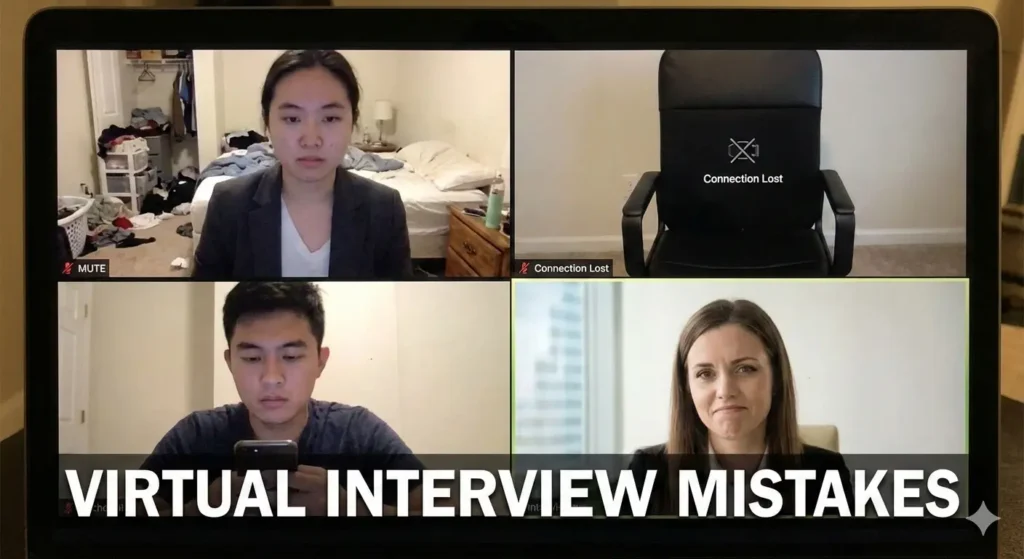
Why Virtual Interviews Are Different From In-Person Interviews
Virtual interviews change the dynamics of communication.
In a physical room:
- Body language is fully visible.
- Energy feels natural.
- Technical issues don’t interfere.
However, online:
- Small gestures look exaggerated.
- Audio delays disrupt flow.
- Distractions increase easily.
According to guidance summarized by Harvard Business Review, virtual presence requires intentional clarity and composure. Therefore, preparation must adjust accordingly.
✅ The DOs of Virtual Interviews
1️⃣ DO Test Technology in Advance before Virtual Interviews
Technology issues create instant stress.
Before the interview:
- Test your internet connection.
- Check camera and microphone.
- Update software if needed.
- Keep backup internet (if possible).
Even strong candidates lose credibility when technical problems dominate the start.
2️⃣ DO Optimize Your Lighting and Camera Position
Lighting influences perception more than most realize.
Best Setup:
- Light facing your face (not behind you).
- Camera at eye level.
- Neutral background.
Avoid:
- Sitting below the camera.
- Strong backlighting.
- Cluttered backgrounds.
Clean visuals build professionalism immediately.
3️⃣ DO Dress Fully Professional before Virtual Interviews
Some candidates dress professionally only on top. That’s risky.
Dress fully as if attending in person. It improves:
- Posture
- Mindset
- Confidence
Professional appearance signals seriousness, even through a screen.
4️⃣ DO Look at the Camera While Speaking
Looking at the screen feels natural. However, interviewers perceive eye contact through the camera.
Therefore:
- Look into the camera when answering.
- Glance at the screen when listening.
- Avoid constantly checking your own image.
Camera eye contact builds connection.
5️⃣ DO Control Your Body Language
Virtual settings amplify movement.
Best Practices:
- Sit upright.
- Use minimal hand gestures.
- Avoid leaning too close to the screen.
- Maintain calm facial expressions.
Small movements matter more online.
6️⃣ DO Eliminate Distractions
Even minor interruptions reduce professionalism.
Before starting:
- Silence notifications.
- Inform family or roommates.
- Close unnecessary tabs.
- Keep water nearby.
A controlled environment shows discipline.
❌ The DON’Ts of Virtual Interviews
1️⃣ DON’T Treat It Casually
Because you’re at home, the interview may feel informal. However, interviewers still evaluate you professionally.
Avoid:
- Casual posture
- Multitasking
- Checking phone
- Interrupting frequently
Professional energy must remain high.
2️⃣ DON’T Overcompensate With Energy
Some candidates try to appear overly enthusiastic online. That often feels unnatural.
Instead:
- Speak calmly.
- Maintain steady tone.
- Avoid exaggerated gestures.
Authenticity beats performance.
3️⃣ DON’T Read From Notes Obviously
Notes are helpful. Reading directly from them is not.
If using notes:
- Keep bullet points only.
- Avoid reading word-for-word.
- Maintain natural eye contact.
Interviewers notice reading immediately.
4️⃣ DON’T Ignore Audio Quality
Poor audio harms clarity more than poor video.
Avoid:
- Noisy environments
- Echo-filled rooms
- Low microphone volume
Clear sound equals clear communication.
According to remote interview best practices published by Glassdoor, technical clarity directly influences candidate perception.
5️⃣ DON’T Panic Over Small Glitches
Minor technical delays happen.
If it happens:
- Stay calm.
- Acknowledge briefly.
- Continue smoothly.
Composure under disruption shows professionalism.
How to Stand Out in Virtual Interviews
Many candidates avoid mistakes. Few actively impress.
Ways to Stand Out:
- Prepare structured answers.
- Use confident pauses.
- Speak clearly and slowly.
- Show engagement while listening.
- Thank the interviewer confidently at the end.
Small details create big differentiation.
Virtual Interview Checklist (Quick Review)
Before logging in:
- Technology tested
- Background clean
- Lighting adjusted
- Outfit ready
- Notes organized
- Notifications off
Preparation reduces anxiety dramatically.
Read more articles on Career Guidance
Why Virtual Interviews Require More Intentional Confidence
In-person presence carries natural energy. Online presence does not.
Therefore, you must:
- Slow down intentionally.
- Show engagement deliberately.
- Maintain composure visibly.
Strong candidates fail virtual interview not due to weak answers, but because presence doesn’t translate well on screen.
Conclusion: Control the Screen, Control the Interviews
Virtual interviews are here to stay. While skills remain critical, digital presence now plays an equal role. When you master the dos and don’ts of virtual interviews, you remove unnecessary risk.
Control the setup.
Control your delivery.
Control your calm.
That control creates confidence, and confidence creates trust.
FAQs
1. Are virtual interviews easier than in-person interviews?
Not necessarily. They require different preparation.
2. Should I memorize answers for online interviews?
No. Structure matters more than memorization.
3. Is it okay to keep notes during a virtual interview?
Yes, but use short bullet points only.
4. Does background really matter?
Yes. A clean background improves professionalism.
5. What’s the biggest virtual interview mistake?
Treating it casually.